
There are a few reasons why a manual invoice/memo would need to be created out of parts in the Outstanding section. In any instance, the invoice will either contain offsetting transactions and have a total of $0.00, require an adjustment from accounting, or match to an unmatched GL posting. When creating a manual invoice/memo, our Memo Nomenclature Guide can be used to determine a unique invoice number. The following are memos that may need to be created:
- Monthly memos such as Plus/Minus, LIFO, and Appreciation/Depreciation
- Clearing up offsetting transactions, receiving errors, pad errors, etc
- Memos for parts received not billed or parts returned not credited for adjustment
- Memos for scrap parts
- Manual invoice for a PO/credit PO that was not written in the DMS
To create a manual invoice in the Outstanding section:
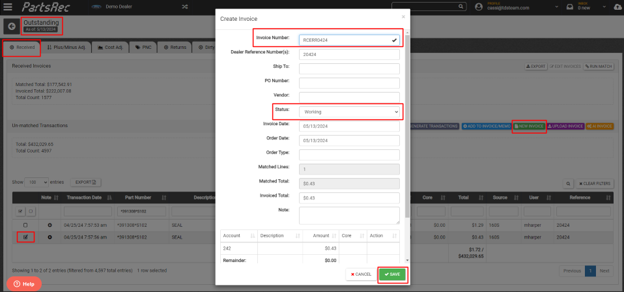
- Navigate to the Outstanding section in PartsRec and the tab where the transactions reside and find the transaction or transactions you want to add. For this example, the invoice will clear a receiving error with a minus adjustment.
- Select the parts to add and click the green New Invoice button.
- Fill in your unique invoice number. Leave the invoice in working status so the offsetting minus adjustment can be added. Click Save.
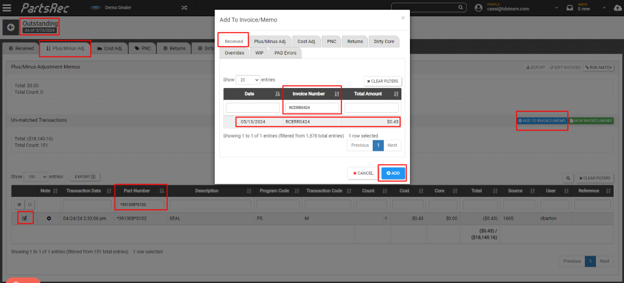
- Navigate to the Plus/Minus Adj tab. Search and select the corresponding minus adjustment, and click the blue Add to Invoice/Memo button.
- In the pop up, select the tab where the memo was created and search the invoice number you assigned. Select the invoice from the list and click the blue Add button.
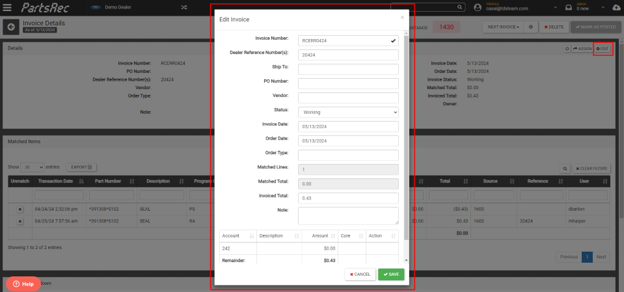
- Once done adding parts, search the invoice number in the search bar or locate the invoice in the tab where it was created. Open the invoice and click the Edit button.
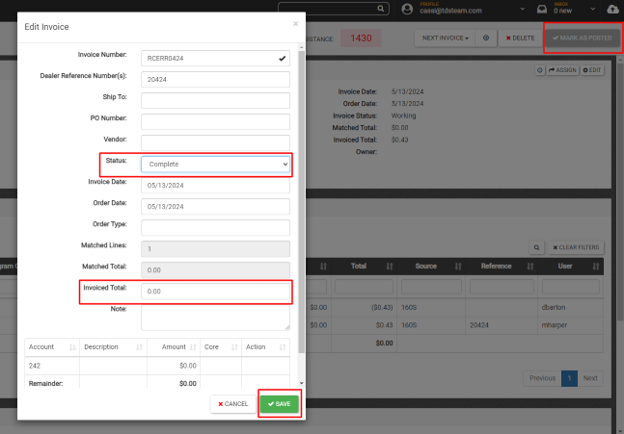
- When creating a manual invoice, the matched total will update when parts are added, but the invoice total does not update. If necessary, update the invoice total. Allocate any excess amount. Mark the invoice as complete. If the invoice/memo is not a wash, notate for accounting to adjust. Save.
- Assign the invoice to accounting if an adjustment is needed. If your matched and invoice total are $0.00, click Mark as Posted.
**The Appreciation/Depreciation monthly memo got CDK users is created in two tabs: Cost Adj and PNC. This is a memo that will require the invoice total to be manually updated after creation and then assigned to accounting to adjust.