
Daily Reconciliation Report
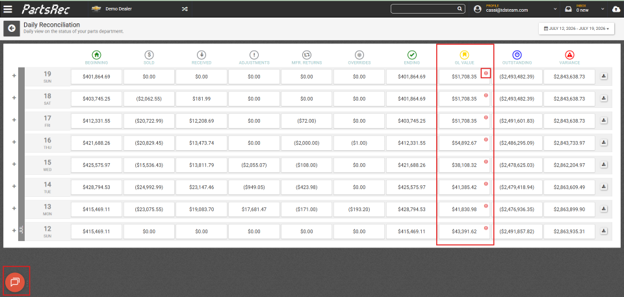
The Daily Reconciliation dashboard helps you compare your parts inventory to your general ledger (GL), identify discrepancies, and resolve them quickly. Movement can be viewed daily across all inventory accounts tracked in PartsRec, from the beginning to the end of the business day, along with the final Outstanding and Variance totals. The plus symbols on the left allow the user to drill down into each day for a detail of each inventory GL.
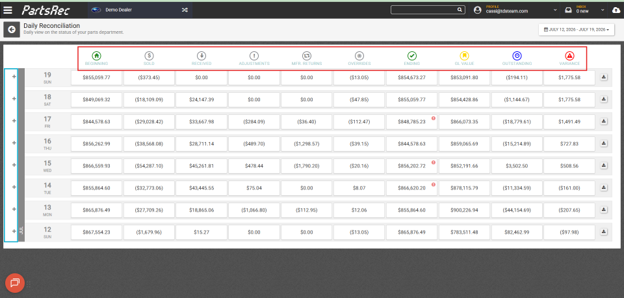
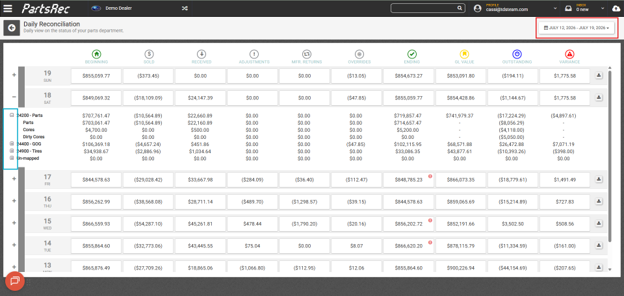
The plus symbols to the left of the individual GL accounts allow for more details information regarding movement for each account. Choose a date range to view with the date picker at the top, right of the screen.
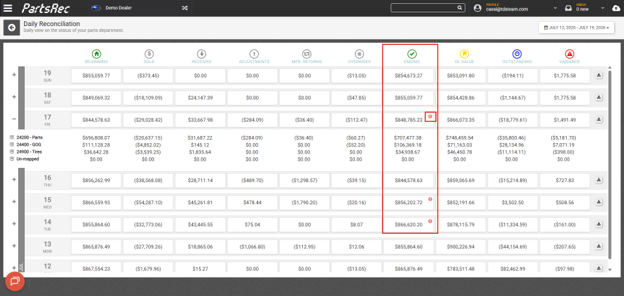
Red Dots in ENDING column
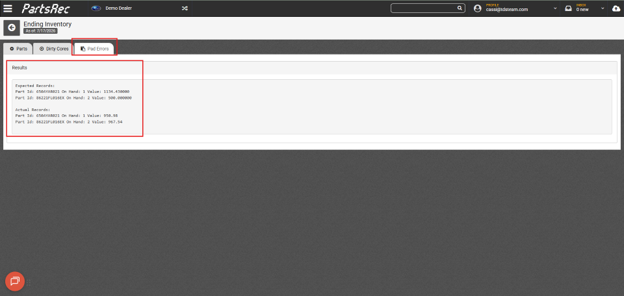
The “ENDING” column is the inventory value at the end of the business day. If there is a red dot with an exclamation point in it in an ending inventory box, this typically indicates a pad error has occurred. To drill into this specific day’s pad error, click on the cell containing the red dot and navigate to the Pad Errors tab in the inventory detail screen. For more about pad errors, see our help article Investigating and Resolving Pad Errors.
Red Dots in GL VALUE column
A red dot with an exclamation in the GL Value column indicates an issue with the GL value itself. This is typically due to data issues but can also be the result of back postings. To resolve, open a ticket with PartsRec support using the red help button. The support team can assist with narrowing down and fixing the issue and ensure data is correct in PartsRec.
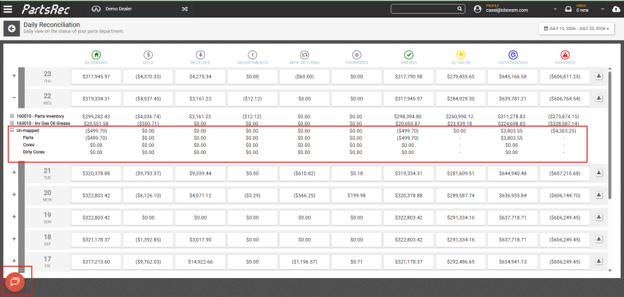
Unmapped and Unknown GL Amounts
- Un-mapped (GL Breakdown):
- Appears when sources are not linked to a GL account
- Unknown (Invoice Matching):
- Indicates a part on the invoice is tied to an unmapped source
Contact PartsRec support with the red help button to have any unmapped sources mapped to the correct GL account.
Best Practices
- Review the dashboard daily for accuracy
- Investigate variances as soon as they appear
- Use drill-down features to quickly pinpoint issues
- Keep sources properly mapped to avoid recurring errors
- Leverage the system’s tracking to identify when and why changes occurred
By using the Daily Reconciliation dashboard consistently, you can maintain accurate inventory records, quickly resolve discrepancies, and confidently reconcile your balance back to zero.