
The Fix Me button allows you to apply transactions or fix missing sources to resolve RO errors. This button is only found on an RO error.

Clicking the Fix Me button opens a dropdown menu allowing you to choose the best way to fix your error. There are three options: Missing Dirty Core, Missing Transaction, and Unknown Account.

Missing Dirty Core
The Missing Dirty Core option removes the core from the RO, applying a positive core value, and creates an offsetting dirty core transaction in Outstanding that can be matched with the core credit from the vendor.

Missing Transaction
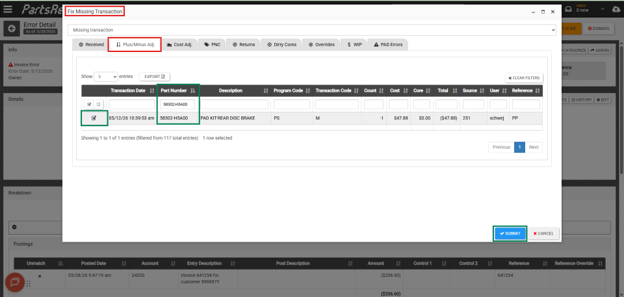
The Missing Transaction option allows you to apply transactions from the Outstanding section to the RO. This is typically used to apply minus adjustments for lube line sales or overrides for split ROs. (Rollover and Split ROs in PartsRec).
Choose Missing Transaction and navigate to the appropriate tab. For example, to apply a minus adjustment, click on the Plus/Minus Adj tab, enter the part number, select it, and click Submit. This will apply the transaction to the RO and change the matched total accordingly. You can apply multiple transactions at once by selecting all necessary transactions before clicking submit.
Unknown Account
The Unknown Account – Blank Sources/Stocking Groups option will allow you to fix blank sources right in the RO. If any parts are listed, simply select the parts, choose the appropriate source in the dropdown, click Apply to add the source to the part, and click Update to map the part to the source in PartsRec.
